Your clients want to know which companies their campaigns are reaching. Right now, most agencies cannot tell them.
Why campaign accountability is harder than it looks
 You can report on clicks, impressions and cost per lead. What you cannot easily report on is which named companies actually arrived on the client's website as a result of the spend. A campaign might drive 2,000 sessions from the right sector but convert only a handful to form fills. The rest disappear. The client sees a cost and a small number of leads, and starts asking whether the budget is working.
This is not a media buying problem. It is a visibility problem. The data exists in the traffic - it is just not surfaced in a way that connects company names to campaign activity.
Website visitor identification fills that gap. It matches the IP address of each business visitor to a company, then attributes that visit to its traffic source. The result is a list of named companies broken down by how they found the site, not just an aggregate session count.
What agencies can do with visitor identification data
Show clients which companies their campaigns reached
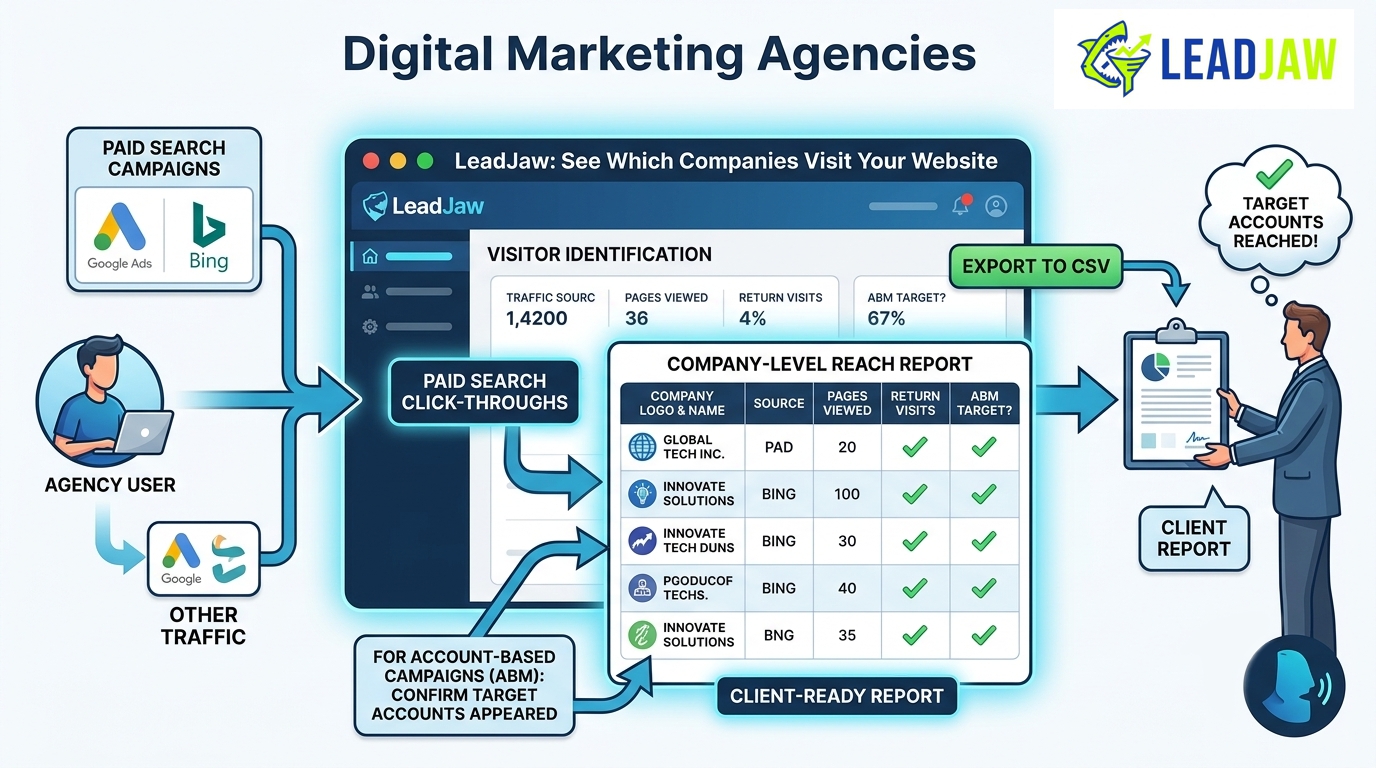
When a paid search campaign drives traffic, LeadJaw shows you which companies clicked through, how many pages they viewed and whether they came back. You can filter results by traffic source and date range, then export to CSV. That becomes a client-ready report that goes beyond impressions and clicks into actual company-level reach.
For clients running account-based campaigns, this is particularly useful. You can confirm whether target accounts appeared in the traffic, even if they never converted to a lead.
Hand clients a warm lead list, not just a traffic report
The second output is more direct. Companies that visit a client's pricing page, return multiple times or spend significant time on key pages are showing intent. LeadJaw surfaces those companies in a dashboard and can push real-time Slack alerts when a named company arrives.
Instead of waiting for a form fill, the client's sales team gets a list of companies that have already shown interest. The agency's role shifts from reporting on traffic to delivering pipeline-ready intelligence.
Prove first-touch attribution
LeadJaw captures the original traffic source for each visitor, not just the last click. If a company discovered the client via a LinkedIn article six weeks ago and came back direct today before filling in a form, the original source is still recorded. That matters when a client asks which channel actually started the conversation.
| Reporting capability | Without visitor ID | With LeadJaw |
|---|---|---|
| Named companies reached by campaign | Not available | Yes, filtered by source and date |
| Companies showing buying intent | Form fills only | All company visits, scored by engagement |
| First-touch attribution | Last click only in most tools | Original source recorded per visitor |
| Real-time company alerts | Not available | Slack alerts per company visit |
| CSV export for client reporting | Not available without custom build | Available on Growth and Pro plans |
How LeadJaw fits into an agency workflow
Setup takes around five minutes. You add a single tracking script to the client's website, either through the WordPress plugin, through Webflow's OAuth integration or by pasting the script directly into the site's code. LeadJaw then starts identifying company visits and attributing them to their source.
The dashboard is clean and filterable. You can search by company name, country, traffic source, date range or engagement level. Slack alerts can be configured per rule, so the client's sales team gets notified when a company matching their target profile arrives, without having to log in and check manually.
HubSpot users get automatic company upserts. When LeadJaw identifies a company, it can push that record into HubSpot so the CRM stays current without manual data entry. That is available on the Pro plan.
What LeadJaw identifies and what it does not
LeadJaw identifies business visitors by matching their IP address to a company. It works well for B2B traffic from office networks and corporate connections. It does not identify visitors on consumer broadband, mobile networks or VPNs, because those IPs do not map to a business.
For most B2B clients, around 20 to 40 percent of traffic will resolve to a named company. The exact figure depends on the audience and the type of traffic the campaigns drive. LeadJaw does not make promises about identification rates because every site's traffic mix is different.
The tool is UK-hosted with data residency in the UK, which simplifies GDPR compliance conversations for UK and EU clients. It identifies companies, not individuals, which keeps it on the right side of UK data protection rules.
Pricing that works for agency budgets
LeadJaw is priced per client account, with no long-term contracts. Plans start at £39 per month. There is a 10-day free trial with no payment card required, so you can test it on a client account before committing.
- Starter at £39 per month covers the core visitor identification dashboard, Slack alerts, Webflow and WordPress integrations, and CSV export. Suitable for smaller client accounts or initial pilots.
- Growth at £74 per month adds increased data volume and is suited to clients with higher traffic levels.
- Pro at £125 per month adds HubSpot integration and API access, which is useful for agencies that want to pipe data into client CRMs or reporting tools.
All plans are available in GBP, USD and EUR. Annual billing saves two months on the Starter plan.
Getting started
The quickest way to see what LeadJaw surfaces on a client's site is to run the free trial. You will have results within a few hours of adding the tracking script, assuming the client is already receiving B2B traffic.
If you want to talk through whether it fits a specific client use case before signing up, the contact form on the website goes directly to the LeadJaw team.
Marketing agencies can use LeadJaw to show clients which named companies their campaigns are reaching, not just aggregate traffic numbers. Visitor identification turns anonymous B2B traffic into a source-attributed company list that supports both campaign reporting and warm lead delivery. Setup takes around five minutes via WordPress, Webflow or direct script installation, with plans starting at £39 per month and a 10-day free trial available.